emporia are an Austrian company that produce a range of devices aimed at the elderly market.
They have recently launched their S4 Smartphone here in Ireland available through An Post Mobile and have sent us a phone to review.
Assisting me with this review is my 86 year old mother in law who now lives at home with us. In the past when my mother in law was living on her own, we had thought her how to use an Android tablet so she could order groceries online. I was therefore interested to find out how she would find using a device that was aimed at being more usable for her.
Inside the box, you get a USB C charger and cable, a set of earphones and a second back cover.
In addition to this, you get an extensive training manual which gives details about how to use every facet of the phone. It’s a really nice addition that the target users will appreciate and while they may not sit down and read it cover to cover, it is very useful to reference when trying to figure out different aspects of the phone.
The emporia S4 is a very well spec’d phone at its price point and includes a lot of features not often seen on phones like this. They include:
The emporia S4 runs Android 10 as its operating system and you need to go through the usual Android setup once you power the phone on for the first time.
For anyone who has set up an Android device in the past, you’ll know that it is not always the smoothest of processes. By default, the screen’s brightness is turned down and there is no way to turn it up until the set up is complete. Font, keyboard and text entry boxes are quite small and on smaller screen devices it can take some dexterity to enter all the details that are required.
Certainly for my 86 year old mother in law, navigating these steps within the Android setup was not something she could have done without assistance.
Once you are finished completing the Android set up the S4 checked for updates, downloaded and applied them and then loaded the custom launcher that emporia uses for their devices.
This was straightforward and the device was then ready to use.
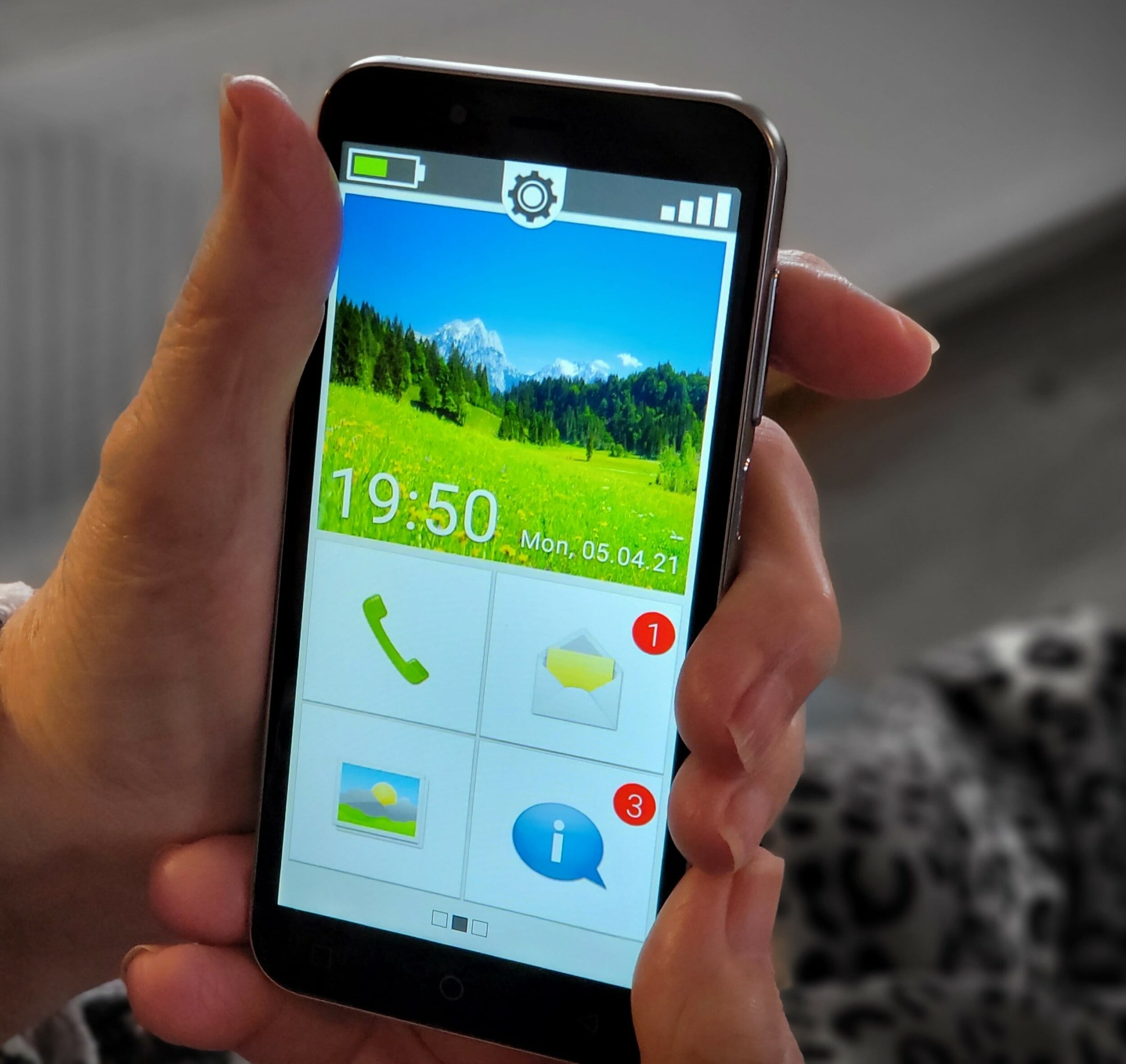
The custom launcher that emporia uses is straightforward and easy to use. Icons are large and easy to press accurately and the layout is kept very simple to remove clutter and possible confusion.
The device is unlocked using a large on-screen slider. The launcher has 3 main pages set up out of the box. On the home page, you have 4 main icons for calls, messages, pictures and notifications along with a smaller link towards the top for settings.
If you swipe to the left there is a page where a number of icons can be assigned to quick contacts along with a link for your voicemail and for the emergency button.
Swiping to the right brings you to a further page of icons where links can be found to things like the browser, the Google Play App Store, the camera and email for example.
As the phone runs Android there are obviously lots of different apps available to download and use. We installed a number of different apps to try out and all worked perfectly. As the device comes with NFC it is also possible to set up contactless payments which is a great feature to have right now in these pandemic times.
When the phone rings large icons appear on the screen for answer and hang up and my mother in law had no issues using the device.
Hearing Aid Support – the S4 is HAC compatible (T4/M4). My mother in law uses compatible hearing aids and the sound was being passed through clearly enough for her to hear the caller without too many issues.
There is a large collection of ringtones and alerts available to choose from and many were suitable to use with someone who is hard of hearing. One function my mother in law likes to use on calls is the speakerphone as she finds it works better with her hearing aids. In this instance, my mother in law felt the speaker could have been louder on calls, especially seeing as how loud the ringtones can be.
emporia Magnifier – the S4 comes with a built-in app that can be used for magnifying text or images using the camera on the phone and is particularly handy for reading the small print on medicine boxes or leaflets.
Font size can be increased in size on the device itself but even at its largest, we would probably like to be able to go a little further. As the screen is relatively small by today’s standards, there is a limit to how far you can go but it would be nice to see an even bigger font size being made available in a later update.
The S4 also comes with a voice to text feature that can make writing messages somewhat easier while reducing the need to use the on-screen keyboard. It is a nice feature to have but it will take a little bit of coaching to show your loved ones how to use it effectively.
Emergency Buton – The device has a dedicated emergency button on the rear of the device.
When the emergency button is pressed, up to five predefined contacts will be called until someone answers. The phone will automatically go into loudspeaker mode. A prepared emergency SMS will be sent to an emergency number. GPS-enabled phones will provide their coordinates with the emergency call. A loud alarm tone will simultaneously sound to draw the attention of anyone in the vicinity to the emergency situation.
If you would prefer not to utilise this feature a second back cover is included in the box which can be fitted and then covers the button preventing it from being pressed.
Up to this point, my mother in law had been using a dumb phone that while great for calls meant she was missing out on many of the modern features smartphones now have. With a device like the S4, it is now easy for her to take pictures and send and receive them and features like NFC payments are a great addition.
With the custom launcher that emporia use, it brings the right level of added features while still remaining easy to use. We’d like to see the initial Android setup being replaced with something that is easier to complete by elderly people but all in all the phone is very straightforward to use and easy to recommend if you or a relative are looking for a device like this.
The emporia S4 is available from An Post now via this link: https://www.anpost.com/Shop/Products/Post-Mobile-Products/Emporia-Smart-Phone-S4
Digital bank Monzo has released its inaugural edition of ‘The Monzo Money Pulse’, a research-led…
eir, Ireland’s leading telecommunications provider, today published its Digital Ireland Report, a landmark nationwide study…
Nevo reports that the Irish car market has crossed a landmark moment. New figures released…
Leading digital bank Monzo has released its inaugural edition of ‘The Monzo Money Pulse’, a…
Irish CEOs are entering 2026 with urgency and focus, responding to rising cost pressures, geopolitical…
Ireland’s transition to electrified mobility continues to strengthen, with two in five Irish consumers (40%)…
Irish Tech News are Ireland’s No. 1 Online Tech Publication and often Ireland’s No.1 Tech Podcast too.
You can find hundreds of fantastic previous episodes and subscribe using whatever platform you like via our Anchor.fm page here: https://anchor.fm/irish-tech-news
If you’d like to be featured in an upcoming Podcast email us at Simon@IrishTechNews.ie now to discuss.
Irish Tech News have a range of services available to help promote your business. Why not drop us a line at Info@IrishTechNews.ie now to find out more about how we can help you reach our audience.
You can also find and follow us on Twitter, LinkedIn, Facebook, Instagram, TikTok and Snapchat.